Like a marketer wroteevery message to your next
Qampi reads each prospect's profile and recent posts, then writes LinkedIn and email outreach they actually answer — and runs it safely on autopilot.
- No credit card needed
- Human-like, LinkedIn-safe sending
- Cancel anytime
Not “Hi [Name]”.
“Hey Sarah, loved your post…”
Same prospect, same goal. One message reads like a template; the other reads like you spent ten minutes on her profile. Qampi writes the second kind, for every lead.
Generic Template
What everyone else sends
To: Sarah Mitchell
VP of Sales at Brightloop
Hi Sarah, I noticed your profile and thought we could connect. We offer a great tool that might help your team grow. Would you be open to a quick 15-minute call next week? Best, Alex
Why it fails

Qampi AI
Written in your voice
To: Sarah Mitchell
VP of Sales at Brightloop
Qampi analyzed
Why it works
From a list of names to booked calls
Four steps, about ten minutes of setup. After that, Qampi does the daily work and hands you the conversations.
- 01
Set up in minutes
Connect your LinkedIn and tell Qampi about your business — your company, value prop, and ideal customer. That's what the AI writes from.
- Connect your LinkedIn account
- Add company info, value prop & ideal customer
- Sync HubSpot, Pipedrive, or Notion (optional)
app.qampi.com/settings/ai-profile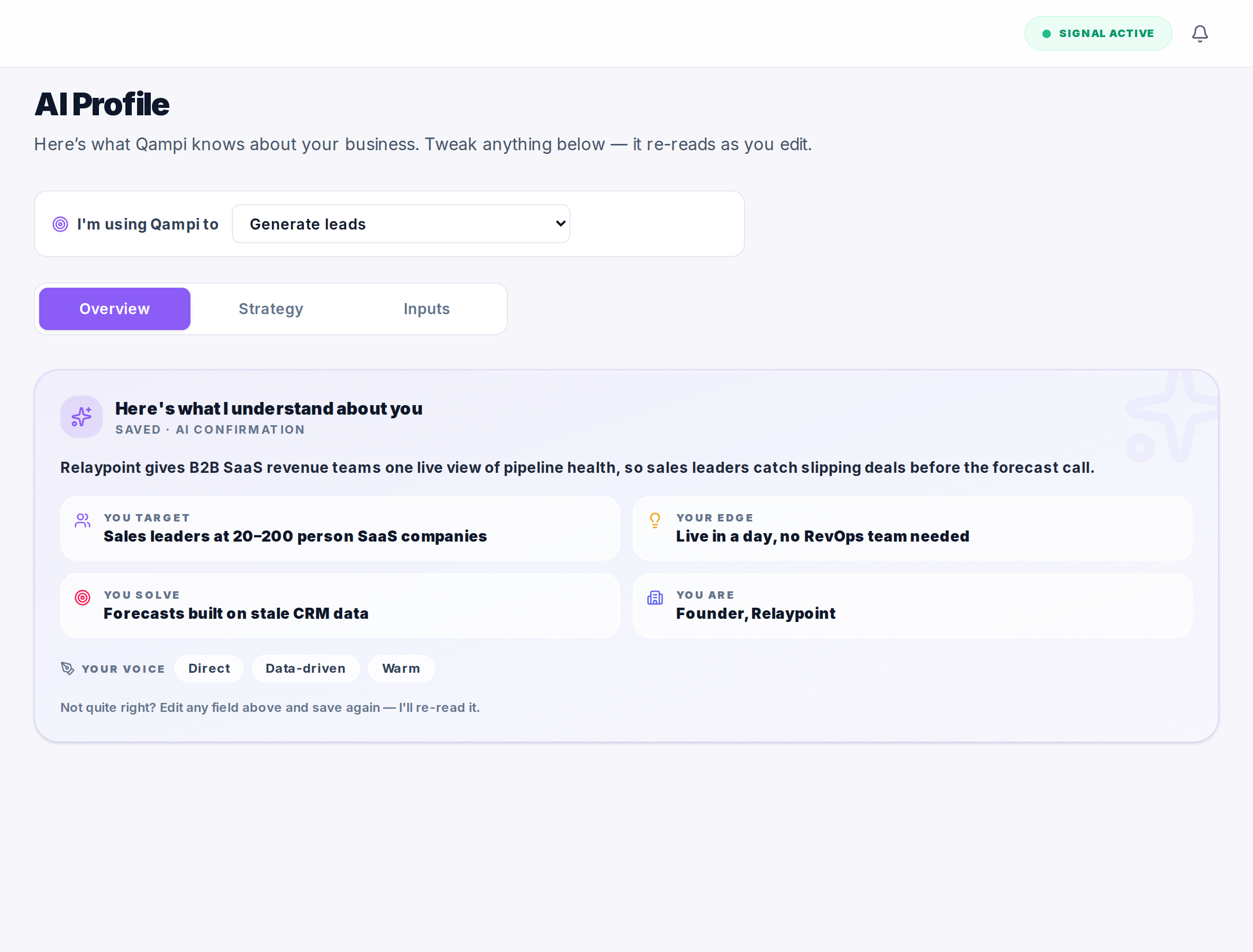
- 02
Import your leads
Pull prospects straight from LinkedIn with the Qampi extension, or upload a CSV / Excel. Every lead is enriched with profile data.
- Capture profiles from LinkedIn with the extension
- Upload a CSV / Excel, or add leads manually
- Auto-enriched with role, company & profile data
app.qampi.com/prospects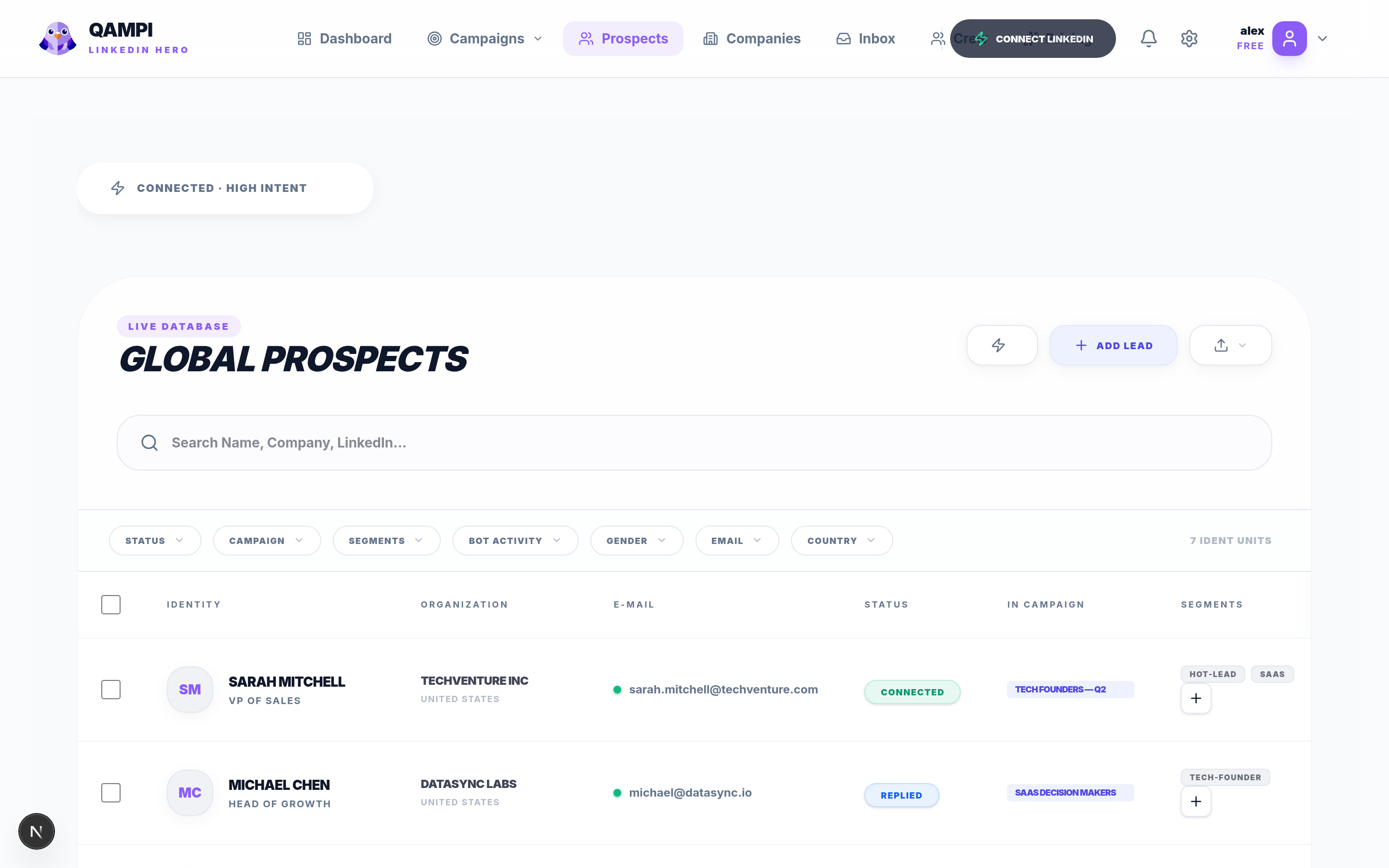
- 03
Launch a campaign
Pick the objective, audience, CTA, and tone. Qampi researches each prospect and writes a personal message — then runs it safely, on autopilot.
- Set your goal, CTA & tone in a few clicks
- Steps: connect, message, like & comment
- Every message shows why the AI wrote it
app.qampi.com/campaigns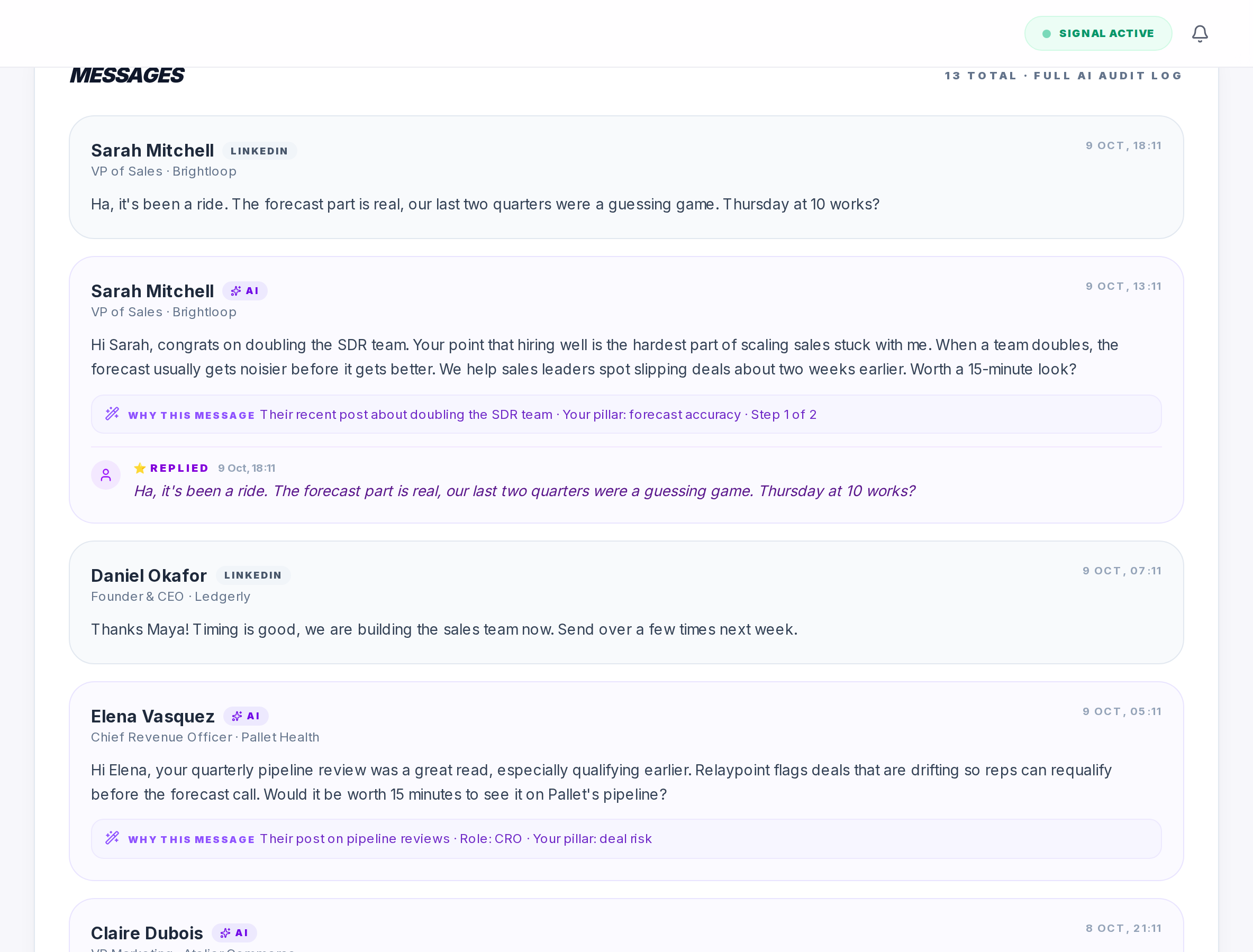
- 04
Watch replies roll in
A live view tracks every invite, connection, and reply — and the moment a lead replies, the automation pauses so you take over.
- Live activity for every action
- Funnel from invite to reply, per campaign
- Auto-pauses on reply · results sync to your CRM
app.qampi.com/campaigns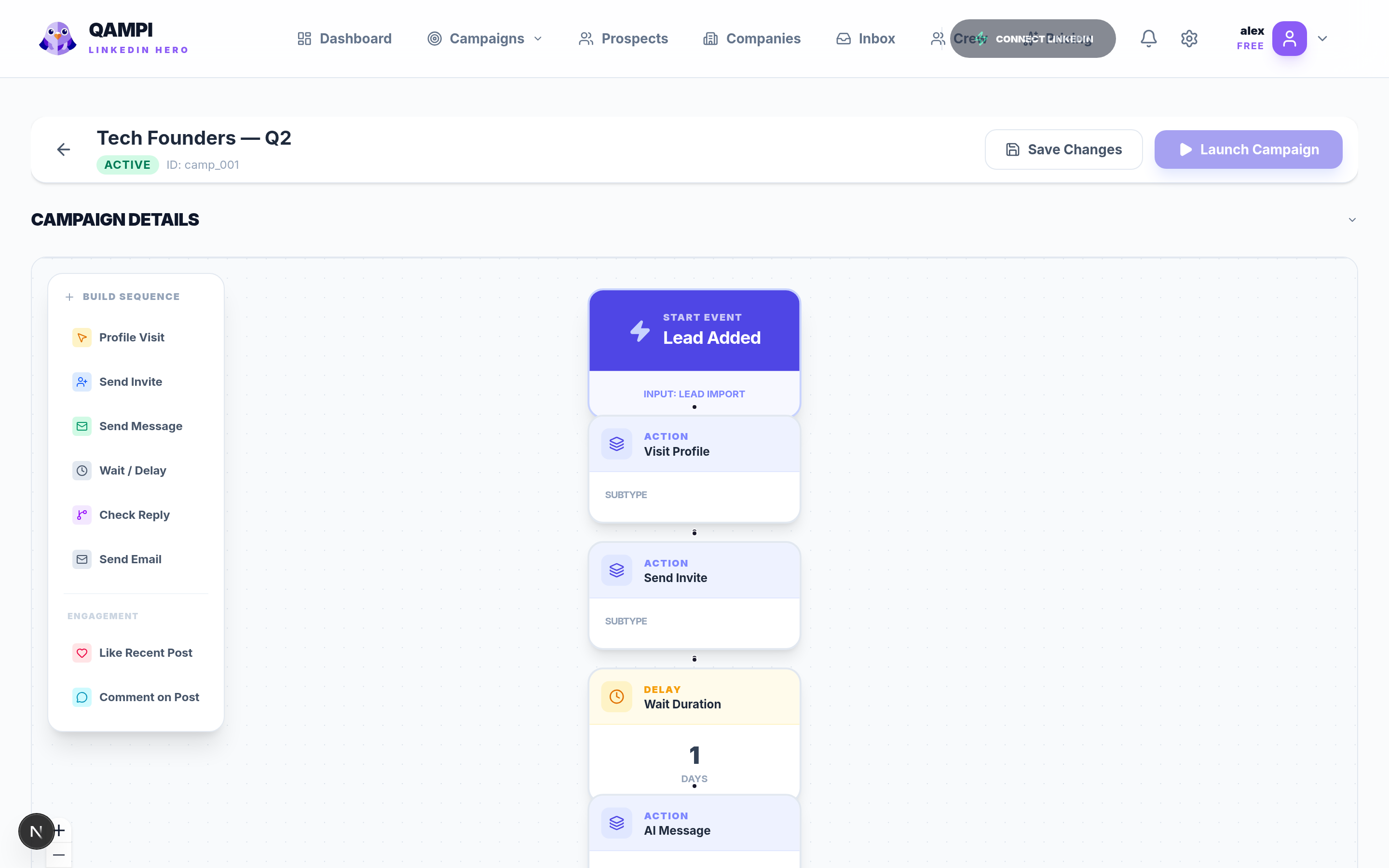
Four inputs. One personal message.
Qampi reads four things before it writes a word — so every message sounds like you, speaks to your offer, and lands with that exact person.
One tool for the whole loop
Find people, find their email, run LinkedIn and email together, and keep every reply in one place — without stitching five tools together.
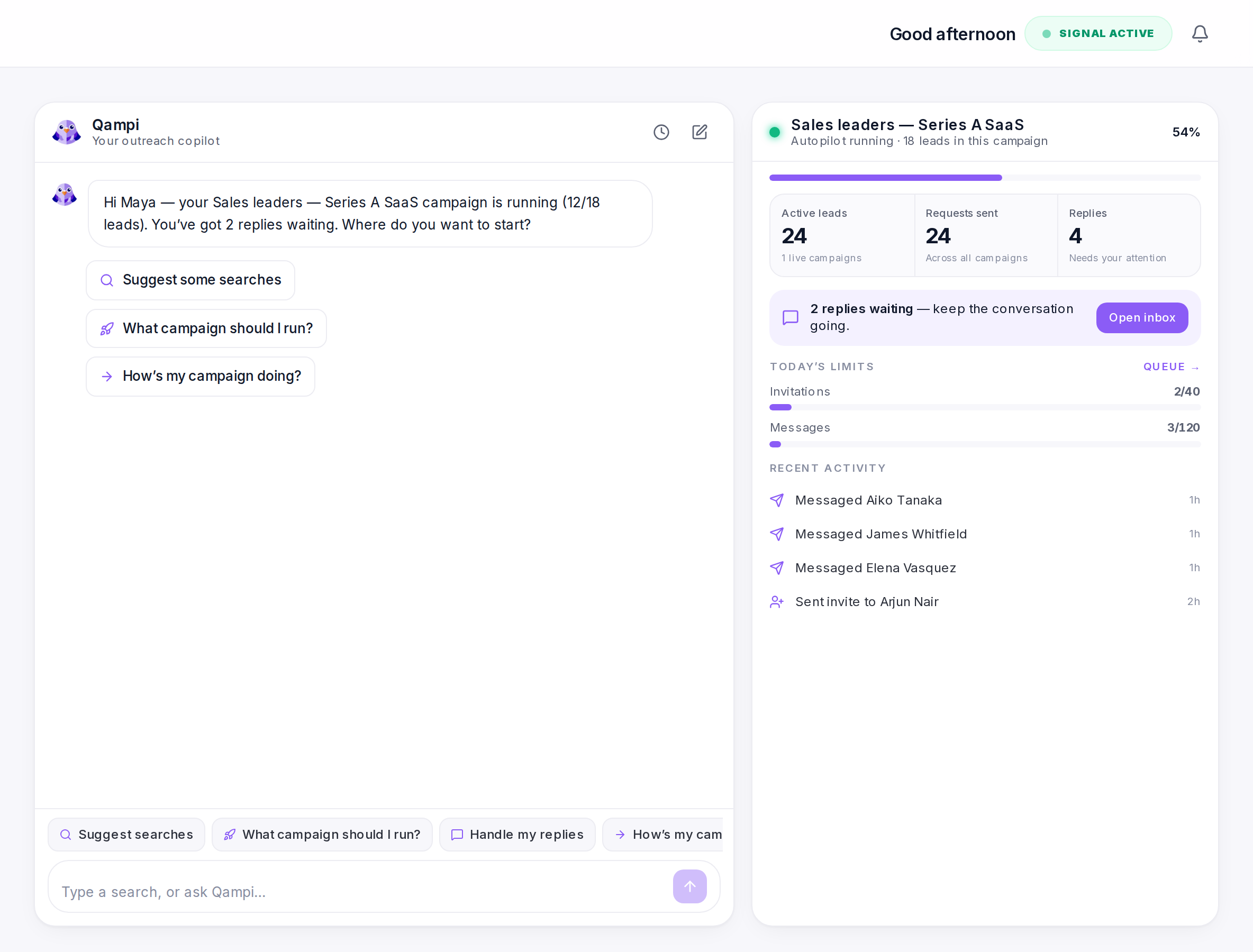
Ask. It does the busywork.
Suggest searches, pick the right campaign, check how one is doing. It knows your profile, your leads, and your limits.
Verified emails, one click.
Looks up a prospect's work address and verifies it, so cold email reaches a real inbox.
Priya Raman
Head of Growth · Cartwheel
LinkedIn + email, one flow.
Visit, invite, message, like, comment, and email in one sequence — or start from 43 ready-made templates.
- Visit profileLinkedIn
- wait 1 dayInviteLinkedIn
- wait 2 daysAI messageLinkedIn
- wait 3 daysAI emailEmail
Run it from your AI agent.
Your agent can find leads and draft campaigns through Qampi. Launches still wait for your yes.
Pick your agentSetup guide
claude plugin marketplace add ShivaSingh9927/qampi-pluginsWorks with your stack
Native CRM sync, your own mailbox, and the API + webhooks for everything else.

- HubSpot

- Pipedrive

- Notion

- Gmail

- Outlook

- Zapier

- Make

Other tools automate. Qampi converts.
Same outreach — done the way that actually gets answered.
QampiBuilt for anyone who needs a reply
Founders
Reach customers and investors from one tool, in your own voice — without losing your day to prospecting.
Sales teams
LinkedIn and email in one sequence, personalized at every seat, with your CRM kept in sync.
Recruiters
Outreach that sounds like a recruiter who did their homework, so passive candidates actually reply.
Job seekers
Turn your resume into notes to the hiring manager, not another application lost in the ATS.
Start free. Pay when it works.
Every account starts on Free. Upgrade when you need more volume — no hidden fees, cancel anytime.
Billed monthly · Switch or cancel anytime
Free
Try the full loop, end to end.
- 20 LinkedIn invites / week
- 100 leads · 10 email credits (one-time)
- AI-written messages
- 4–5 starter templates
- Copilot lead search
- Inbox sync + reply
- Community support
Core
For solo founders & freelancers.
- 300 LinkedIn invites / month
- 1,500 leads · 100 email credits / mo
- AI-written messages
- All 43 templates
- Full Qampi copilot
- CRM sync (HubSpot, Pipedrive, Notion)
- Email support (48h)
Pro
For growing sales teams.
- 800 LinkedIn invites / month
- 2,500 leads · 300 email credits / mo
- Everything in Core
- Public API + webhooks (Zapier, Make, n8n)
- Priority support (4h)
Business
Multichannel at full scale.
- 800 LinkedIn invites / month
- 5,000 leads · 500 email credits / mo
- Everything in Pro
- Cold email + multichannel campaigns
- Team workspace (up to 25 seats)
- Priority support (4h)
Every plan gets the same account protection, Free included: a dedicated proxy for each LinkedIn account, human-like pacing, and a hard safety ceiling of 18 invites and 40 messages a day.
Questions, answered
Still unsure? Start on the free plan — it runs the whole loop, no card needed.
Your next reply is one campaign away
Connect LinkedIn, pick your leads, and let Qampi write the first message. Free to start, no card needed.